Introduction to Paracore
Paracore is a local-first C# automation platform for Autodesk Revit. It compiles and executes standard C# scripts live inside Revit — no boilerplate, no compilation step, no restart required. Built for BIM managers, architects, and developers who need the full power of the Revit API without the traditional barriers.
Why Paracore?
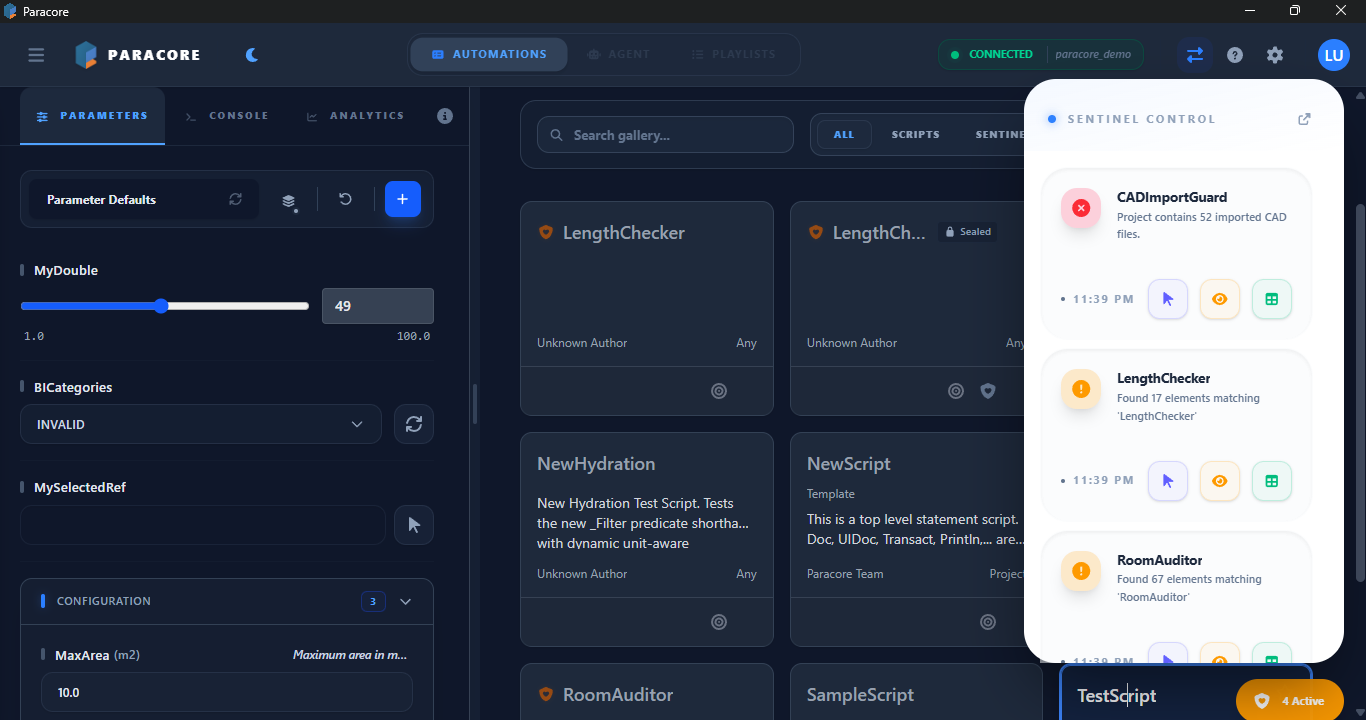
Paracore is not a new language or visual programming environment. You write plain C# using top-level statements. The engine compiles your code on-the-fly with Roslyn and executes it in-process within Revit — giving you instant feedback and direct access to every corner of the Revit API.
Key Strengths
- Zero-Boilerplate Parameter Engine: Turn C# properties into rich UI controls instantly — dropdowns, sliders, toggles, element pickers — without writing a single line of UI code.
- Fluent DSL for Revit:
GetElements<Wall>(),.WhereParam("Function", "Exterior"),.GroupByParam("Level", "Length", "m"),.Table()— chainable, unit-aware, transaction-safe extension methods that replace pages of raw Revit API boilerplate. - Paracore MCP: Connect Claude Desktop, Cursor, or any MCP client to Revit. The LLM writes C# using Paracore's fluent DSL, explores your model, and shows you the code before execution. One C# compiler replaces thousands of hardcoded AI tools.
- Interactive REPL: A persistent C# scratchpad with session-scoped variables. Explore model data, prototype logic, and execute one-off commands with instant feedback.
- Always-On IDE Sync: Every save in VS Code is reflected in Revit within 500ms. Paracore scaffolds a full IntelliSense workspace around your scripts —
.csproj,.sln, andglobal usingdirectives for every namespace you need. - MCP Server: Expose the REPL engine to any MCP-compatible AI tool (Claude Desktop, Cursor, Cline). External AI assistants can explore your Revit model and execute scripts with your approval.
The Five Pillars
Paracore provides five distinct environments tailored to different stages of the BIM automation lifecycle:
1. Script Authoring (Reusable Tools)
Build Modular Projects with editable parameters, rich UI metadata, and cross-team distribution. Scaffold a full VS Code workspace from any gallery script and use AI coding assistants to generate production-ready automation tools.
2. Paracore MCP (AI-Powered Automation)
The MCP server lets any MCP-compatible AI client control Revit through natural language. It writes and executes C# on the fly using Paracore's fluent DSL. Every code change is shown for your approval before it touches the model.
3. Interactive REPL (BIM Laboratory)
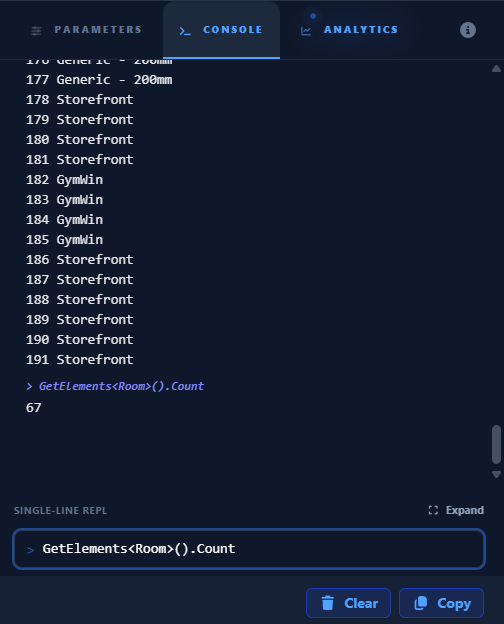
A persistent C# scratchpad with direct Revit API access. Define variables in one turn and reference them in the next. Explore model data, prototype logic, and visualize results with tables and charts — all without leaving Revit.
4. MCP Server (AI Tool Integration)
The REPL engine exposed as an MCP (Model Context Protocol) server. Connect Paracore to Claude Desktop, Cursor, Cline, or any MCP-compatible client. External AI tools can explore your model schema and execute scripts in Revit — with you in control at every step.
5. Sentinels (BIM Watchdogs)
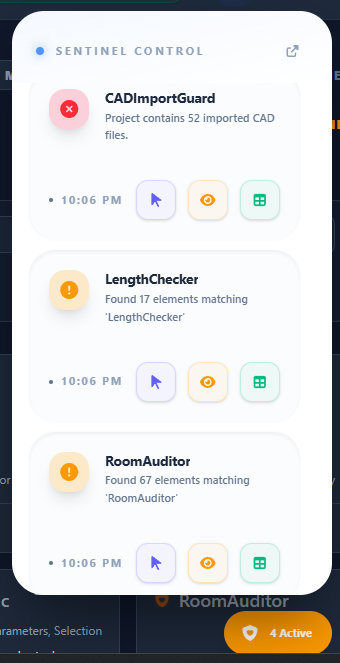
Background model monitoring that runs on Revit idle. Sentinels watch for compliance breaches and report them in real-time, moving model validation from "post-process audit" to quality at the source.
Active Data Workflow
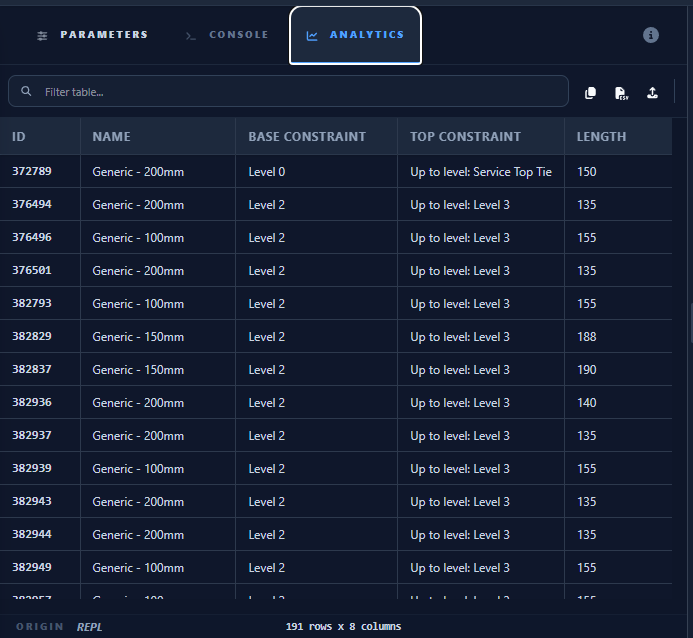
Paracore transforms script results into an interactive results table. Edit parameters directly in the grid, export to CSV for bulk edits in Excel, or pipe data into Jupyter Notebooks for Pandas analysis.
Architecture at a Glance
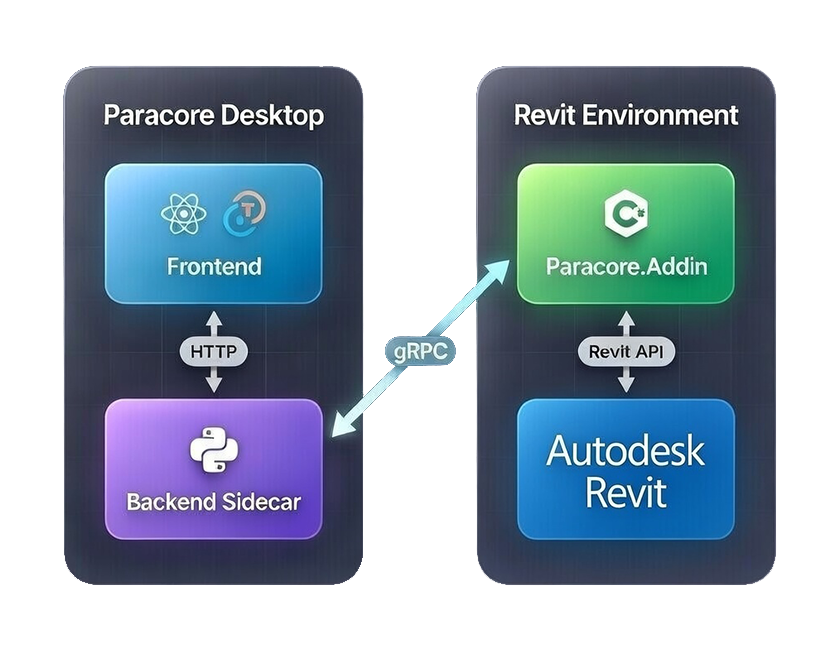
Paracore consists of four primary layers working in harmony:
© 2026 Paracore. All rights reserved.
Autodesk® Revit® is a registered trademark of Autodesk, Inc. Paracore is an independent software and is not affiliated with, endorsed by, or sponsored by Autodesk, Inc.
- Paracore Revit Add-in: The execution host inside Revit, providing direct API context. Uses
Paracore.Shimfor absolute DLL isolation — zero conflicts with pyRevit or any other add-in. - Paracore Desktop App: A React + Tauri application for script management, parameter configuration, and workflow orchestration.
- Backend Sidecar (rap-server): A local FastAPI service managing script discovery, MCP server, and communication between the desktop app and the Revit add-in.
- CoreScript Engine: The Roslyn-powered C# compilation and execution engine at the heart of everything — REPL, MCP, and Gallery all run through it.
Paracore is built for speed, simplicity, and the full power of C#. Welcome to a new way of automating Revit.
📬 Stay Updated
Get notified about new releases, automation tips, and production-ready scripts.
🏗️ Need Custom Revit Automation?
We build tailored C# automation solutions for architecture and engineering firms.