System Architecture
Paracore is designed as a decoupled, high-performance ecosystem. This architecture provides a Dynamic Execution Environment that enables a rapid, iterative workflow for both human developers and AI agents.
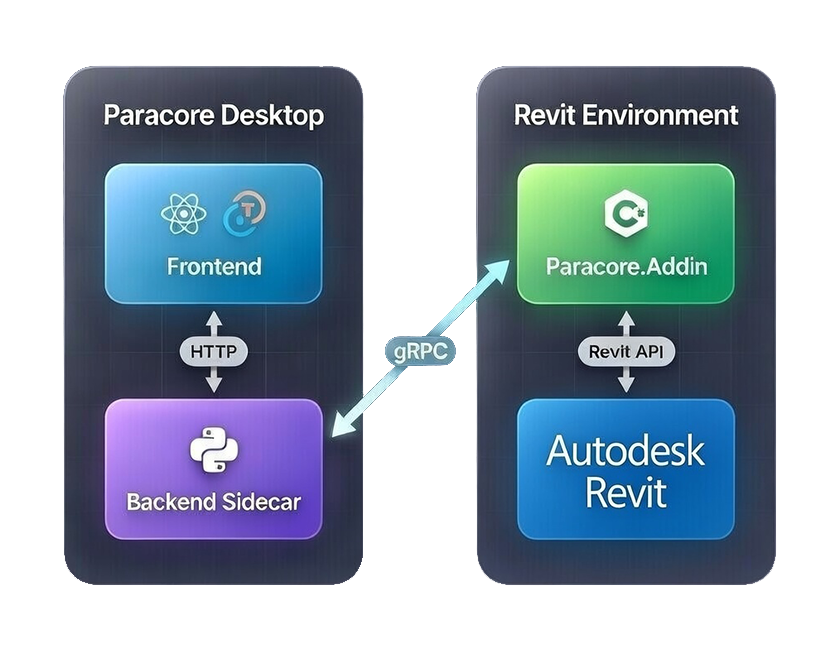
© 2026 Paracore. All rights reserved.
Autodesk® Revit® is a registered trademark of Autodesk, Inc. Paracore is an independent software and is not affiliated with, endorsed by, or sponsored by Autodesk, Inc.
The Pillars of Paracore
1. Paracore Desktop App (The Control Center)
Built using React, TypeScript, and Tauri, this is the main standalone application installed on the user's computer. It handles script discovery, parameter configuration, results visualization, and workflow orchestration.
- The Python Sidecar (
rap-server): Bound entirely to the lifecycle of the desktop app, this lightweight Python/FastAPI environment acts as the central middleman. It translates the frontend's HTTP requests into gRPC calls for Revit. It also manages the MCP Server (Model Context Protocol for external AI tools), local data persistence via SQLite, and workspace scaffolding for VS Code.
2. Paracore Revit Add-in (The Execution Engine)
From the user's perspective, this is a single, lightweight plugin installed into Revit. It acts as the execution bridge, enabling your C# logic to interact with the live model. Internally, the Add-in achieves this through two highly resilient components:
Paracore.Shim(Absolute Isolation): A specialized entry point inside Revit that dynamically bootstraps the core engine into a dedicated AssemblyLoadContext (ALC). This strict memory boundary encapsulates internal dependencies (such as Roslyn and Protobuf) preventing them from leaking into Revit's default AppDomain. This guarantees Paracore will never conflict with complex third-party extensions like pyRevit.Paracore.Server(The .NET Sidecar): A dedicated.NET 8process that runs as a sidecar to the Revit Add-in. This out-of-process sidecar hosts the gRPC communication layer, receiving tasks from the Desktop App's Python middleman. By bundling its own ASP.NET Core framework, it permanently eliminates "missing DLL" failures and deployment headaches.
3. Paracore MCP (The Intelligence Layer)
A standalone FastMCP server that exposes the REPL engine via Anthropic's Model Context Protocol. Connect Claude Desktop, Cursor, Cline, or any MCP-compatible client to explore your Revit model and execute scripts — with human-in-the-loop approval for all model changes. Uses sovereign code generation — the LLM writes C# using Paracore's fluent DSL as its primary tool.
4. SessionGate (Security)
The first time an MCP client tries to execute code in a new Revit session, a TaskDialog appears in Revit asking you to approve that source. Approve once and all MCP sources are cleared for the rest of that session. Manual execution (REPL, Gallery, Playlists) is never gated — your own code runs immediately. All AI-generated code is scanned before execution.
📡 Responsive Communication
Paracore uses a high-speed HTTP/gRPC bridge to ensure communication between your code, the UI, and Revit happens in milliseconds.
One Source of Truth (Project Scaffolding)
In V4, Paracore establishes a permanent link between your script source and your development environment.
- In-Place Scaffolding: When editing a script, Paracore scaffolds the necessary C# project files (
.csproj,.sln,Globals.cs,.github/copilot-instructions.md) directly into the script's folder. - Non-Destructive: This process is entirely additive. It does not move or overwrite your source files; it simply builds a professional IDE environment around them.
- Direct Workspace: This model allows you to leverage the full power of VS Code on the actual source files that Revit executes, ensuring perfect synchronization without the need for temporary copies or file-watching cycles.
- Cleanliness: Files are organized with executable logic in the
Scripts/folder, keeping your library tidy while providing a full professional IDE context with IntelliSense for every Revit API namespace.
Next: Understand the different Script Types supported by Paracore.